How to Create a Digital Menu for a Small Cafe in 2024
October 9, 2026
Creating a digital menu for a small cafe involves choosing a platform to host your menu online, entering your items and prices, and then giving customers a way to access it—typically through a QR code, NFC card, or link. Most cafe owners can set up a basic digital menu in a few hours using either dedicated menu platforms or simple website builders.
Choose Your Digital Menu Platform
The first decision is where your menu will live online. You have several options, each with different trade-offs for a small cafe.
Dedicated digital menu platforms are designed specifically for restaurants and cafes. They typically include features like menu editing interfaces, the ability to organize items into categories, and options to add photos and descriptions. These platforms host your menu on their servers, and you get a web address that opens your menu.
Alternatively, you can create a simple page on your existing website if you already have one. This works well if you have basic web editing skills or someone who can help you. A PDF menu uploaded to your website is the simplest option, though it's harder for customers to read on phones and you'll need to upload a new file every time prices change.
Social media platforms like Instagram or Facebook can also serve as informal digital menus, but they're not designed for this purpose and customers often find them awkward to navigate when looking for specific items and prices.
Enter Your Menu Items
Once you've chosen a platform, you'll need to input your menu. Start by organizing items into clear categories: drinks, food, pastries, specials, and so on. For each item, include the name, a brief description if needed, and the price.
Keep descriptions short and accurate. Customers want to know what they're ordering, not read an essay. If you serve a cappuccino, you don't need to explain what a cappuccino is—but if you make it with oat milk by default, mention that.
Photos can help, especially for food items, but they're not essential for a small cafe. If you do add photos, use clear, well-lit images. Poor quality photos often work against you.
Check everything twice. Incorrect prices or outdated items frustrate customers and create problems for your staff.
Decide How Customers Will Access Your Menu
You need a bridge between the physical world of your cafe and your online menu. Here are the main options.
QR codes are the most common solution. You can generate a QR code that links to your menu's web address using free online tools, then print it and place it on tables, at the counter, or in your window. The downside is that QR codes look technical and some customers find them off-putting or don't know how to scan them.
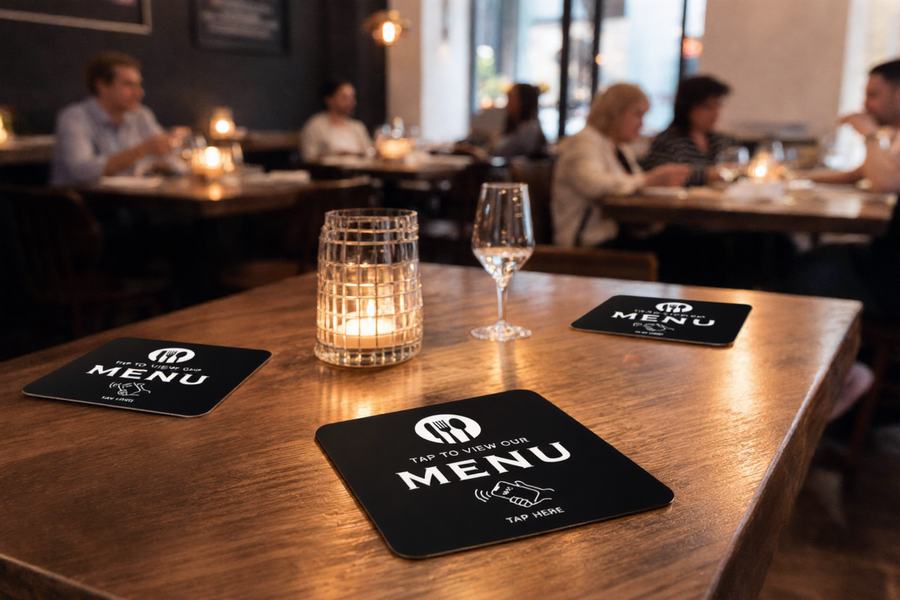
NFC cards offer a more elegant alternative. These are plastic cards embedded with a small chip. When a customer taps their phone against the card, the menu opens in their browser. Newer iPhones (XS, XR and later models) read NFC tags automatically in the background without needing any app. Older iPhones require a specific NFC reading app. Android phones can read NFC tags as long as NFC is switched on in settings. The NFC chip only works when the phone is held very close—within a few centimeters. Services like TapToMenu provide these cards along with a platform to manage your menu, and they can be particularly appealing for cafes that want a modern, minimalist look.
You can also simply tell customers the web address of your menu, though most people won't want to type a long URL into their phones.
Keep Your Menu Updated
A digital menu only works if it's accurate. When you run out of an item, mark it as unavailable or remove it temporarily. When prices change, update them immediately. When you add a seasonal special, put it on the menu that same day.
This is actually the main advantage of digital menus over printed ones: you can make changes instantly without reprinting anything. But only if you actually do it.
Assign someone on your team to be responsible for menu updates, or handle it yourself. Make updating the menu part of your regular routine, just like restocking or cleaning.
Frequently Asked Questions
Do customers need to download an app to view my digital menu?
No. Digital menus open in the web browser that's already on their phone, whether they access it through a QR code, NFC card, or direct link. They don't need to download anything.
Can I change my menu items after I've set everything up?
Yes. All digital menu platforms allow you to edit your items, prices, and descriptions whenever you need to. This is one of the main benefits compared to printed menus.
What happens if a customer's phone doesn't have internet?
They won't be able to load your digital menu. For this reason, many cafes keep a simple printed menu or a board as a backup, especially in areas with unreliable mobile coverage.
Tap the card. The menu opens.
An NFC menu card for restaurants and cafes. Guests hold their phone near it and your menu opens instantly, automatically translated into their language. No app, no printing new menus.
Order your cards